

Replacing an iPad battery is one of the most effective ways to extend the life of your device, restore battery performance, and avoid unnecessary upgrades. Since iPad batteries are sealed and not user-removable, the replacement process must be done carefully either through Apple, an authorized technician, or a trusted repair service. Understanding the safest and most reliable options ensures you protect your device and get the best long-term results.
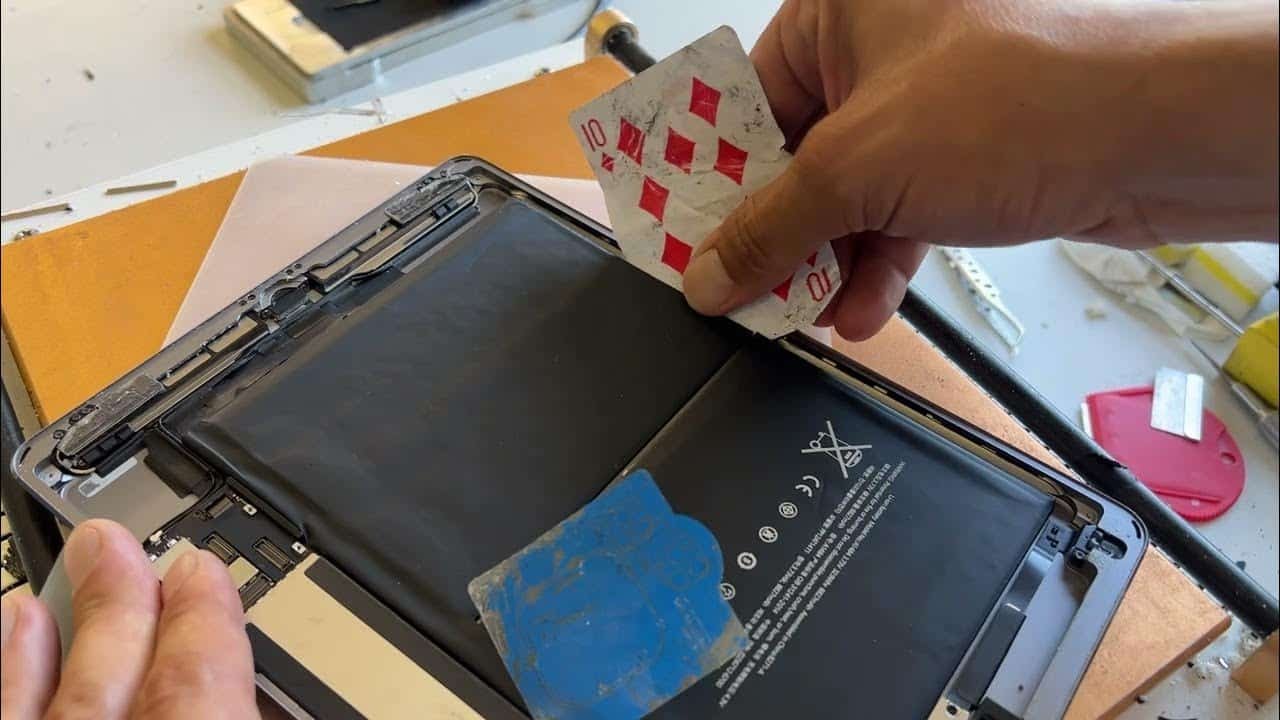
This guide explains the best ways to replace an iPad battery, how each method works, what it costs, and what you should consider before choosing a replacement path.
Table of Contents
When Should You Replace Your iPad Battery?
Before choosing a replacement method, it helps to know when the battery is actually due for service. iPads typically show signs of decline after several years of use. Indicators include rapid battery drain, unexpected shutdowns, long charging times, system slowdowns, overheating, and battery health readings below 80%.
If you notice any of these issues consistently, replacing the battery becomes a worthwhile investment – often restoring performance to near-new levels.
Best Ways to Replace an iPad Battery
Apple provides multiple official and third-party options for battery replacement. Each method varies in cost, turnaround time, and risk. Below is a clear breakdown of the best, safest, and most commonly used ways to change an iPad battery.
1. Battery Replacement Through Apple Care+ Plan (Under Warranty Method)
Starting with our first option, you must check whether your device is in the warranty period or not before heading out to the apple store. Apple iPads come with a year standard warranty or with the Apple Care+ plan, it gets extended up to two years and has some added benefits.
If you have an Apple Care+ warranty, some additional benefits are also given to you, like access to the Express Replacement Service from Apple. There was one of my friends who told me about this, you will be given a replacement iPad, yeah you read it right, a replaced iPad, not a battery, and the best part is, that apple is gonna pay for it not you.
2. Battery Replacement Through Apple Support (Most Reliable Method)
The safest and most recommended way to replace an iPad battery is through Apple Support. Apple technicians use original parts, follow strict repair standards, and reseal the device properly to maintain durability. This ensures both quality and safety.
How Apple’s battery replacement process works
- You initiate a repair through the Apple Support website or the Support app.
- Apple checks eligibility and provides a repair estimate based on your model.
- You can bring the device to an Apple Store or mail it in.
- Apple replaces the battery and reseals the iPad professionally.
- The device is returned fully tested and ready to use.
Apple’s pricing is standardized, so you know the cost before committing. While it may take a few days especially for mail-in service – it remains the most secure and reliable option.
3. Use an Apple Authorized Service Provider (AASP)
Authorized Service Providers offer the same repair quality as Apple Stores, often with shorter wait times and more convenient locations. These providers follow Apple’s repair guidelines and use genuine batteries, ensuring the replacement matches factory specifications.
Why choose an AASP
- Repairs use genuine Apple parts
- Technicians are Apple-certified
- Turnaround times may be faster than Apple Stores
- Warranty-safe replacement
In areas without nearby Apple Stores, AASPs are often the most accessible option.
4. Use a Professional Third-Party Repair Shop (Cost-Effective but Requires Caution)
Many independent repair shops offer iPad battery replacements at lower prices than Apple. While this option can be more affordable and faster, the quality varies significantly between providers.
Benefits of third-party repair shops
- Lower cost compared to Apple
- Same-day or next-day replacement
- Convenient for older iPads no longer supported by Apple
Risks to consider
- Non-genuine batteries may not perform as well
- Poor sealing can affect safety or durability
- Warranty may be voided
Choose a reputable repair shop with strong reviews, clear warranties, and experienced technicians.
5. DIY iPad Battery Replacement (Not Recommended for Most Users)
Although DIY kits exist, replacing an iPad battery yourself is extremely difficult. iPads are sealed with strong adhesives, internal components are delicate, and battery removal can be hazardous without proper tools.
Why DIY is rarely the best option
- Requires heat tools, prying tools, and technical skill
- Risk of screen damage during removal
- Lithium-ion batteries can puncture or swell
- Resealing the iPad is challenging without professional equipment
DIY replacement should be attempted only by users with prior repair experience.
6. Replace Through Corporate or School IT Departments (For Managed Devices)
Organizations using Apple School Manager or Apple Business Manager may send iPads through their IT departments for standardized battery replacements. These institutions typically work directly with Apple or authorized repair partners.
When this applies
- Classroom iPads
- Work-managed devices
- Tablets under corporate maintenance plans
This ensures consistent service and reduces downtime for large fleets of devices.
What to Do Before Replacing an iPad Battery
Preparing your device ensures a smooth replacement experience and protects your data.
Important steps
- Back up your iPad through iCloud or Finder.
- Turn off Find My iPad if sending it to Apple.
- Remove accessories such as cases or screen protectors.
- Take note of your Apple ID credentials for reactivation.
Proper preparation prevents delays and protects your personal information.
How Much Does iPad Battery Replacement Cost?
Apple’s pricing varies by model but generally falls into a predictable range. For most recent iPads, battery replacement through Apple or an AASP is more affordable than expected and significantly cheaper than buying a new device. Third-party prices vary widely depending on location and battery quality.
While DIY is the cheapest option, the risk and difficulty make it unsuitable for most users.
Is It Worth Replacing the Battery or Buying a New iPad?

Whether replacement is worth it depends on your device’s age and performance:
- For newer iPads (under 5 years old): Battery replacement is almost always worthwhile.
- For mid-range older iPads: Replacing the battery can extend usability for several more years.
- For very old models no longer supported by iPadOS: Upgrading may be the better long-term choice.
A new battery often restores speed, stability, and productivity to aging devices – making replacement a smart investment.
Frequently Asked Questions
How long does a replaced iPad battery last?
Most new iPad batteries last several years with normal use.
Does battery replacement erase my data?
No. Apple does not erase data for battery-only repairs, but you should still back up the device.
How long does Apple take to replace a battery?
Usually between 3-5 days for mail-in, or 1-2 days at stores.
Are third-party batteries safe?
They can be, but quality varies. Use reputable repair centers to minimize risks.
Can I check battery health on an iPad?
Newer versions of iPadOS provide a Battery Health menu showing maximum capacity and service recommendations.
Conclusion
The best ways to replace an iPad battery include going through Apple Support, using an Apple Authorized Service Provider, relying on reputable third-party repair shops, or only for experienced users attempting a DIY replacement. Choosing the safest and most reliable option ensures your iPad continues performing well for years, avoids damage, and maintains long-term battery stability.
A professional battery replacement can give an older iPad new life, eliminate frustrating shutdowns, and restore all-day power – often for a fraction of the cost of buying a new device.

Ben Scott is a prominent technology journalist and reviewer, specializing in tablet devices. He is known for his comprehensive and unbiased reviews of tablets from various manufacturers.
With a deep understanding of tablet technology, including hardware components, operating systems, and software applications, Scott provides clear and informative reviews accessible to readers of all levels of technical expertise.
His attention to detail and in-depth analysis have earned him a loyal following of readers.